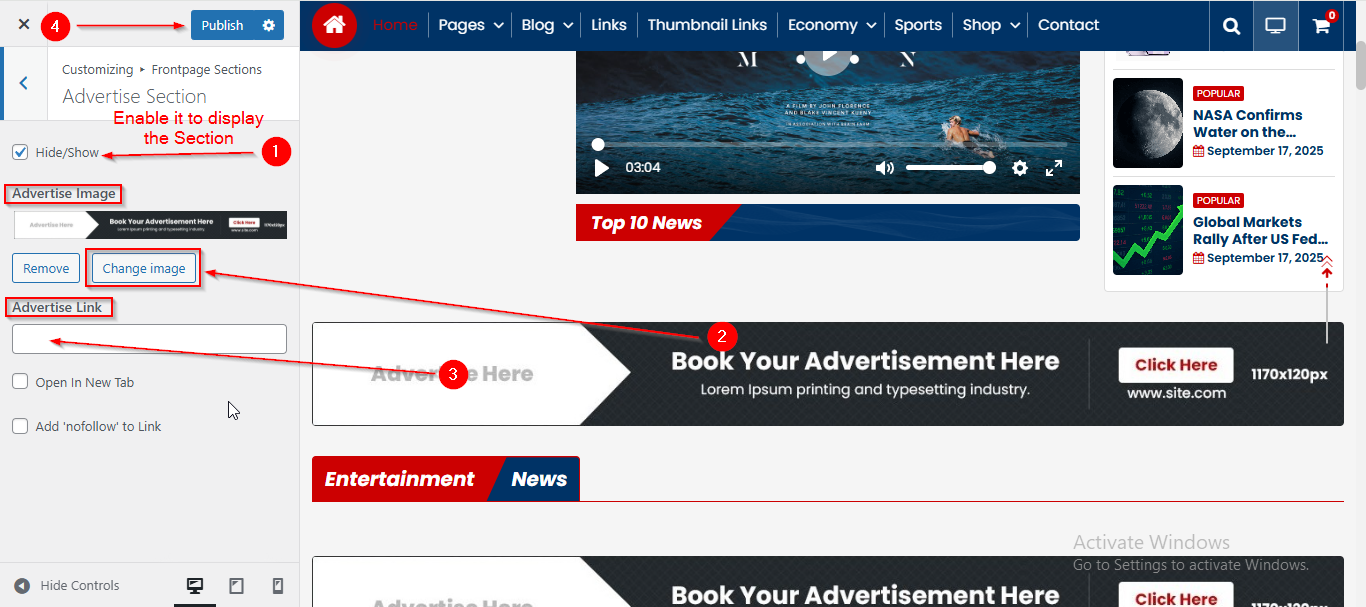
In this article, you’ll learn how to set up and customize the Advertise Section of the News 25 Pro theme, This guide will help you configure these settings to align with your site’s branding and functionality needs.
Before we begin, please note that this theme includes multiple Advertisement sections. In this article, we will focus on just one of them, as the setup process is the same for all the others.
Before proceeding, ensure you’re logged into your WordPress Dashboard.
To manage the Advertise Image in the Advertise Section, follow these steps:
- From the WordPress Dashboard, navigate to Appearance > Customize.
- On the Customizer page, go to Frontpage Sections > Advertise Section.
- From the Advertise Image option you can select the Image.
- In the Advertise Link enter the Link.
- Click Publish when you’re done.
Note: Ensure the checkbox labeled Hide/Show is checked if you want to display the Section.