Many of our clients experience an issue where the mobile menu does not appear properly in this theme.
The good news is that this is a common issue and can be fixed very easily. Simply follow the steps outlined in this guide to resolve it quickly.
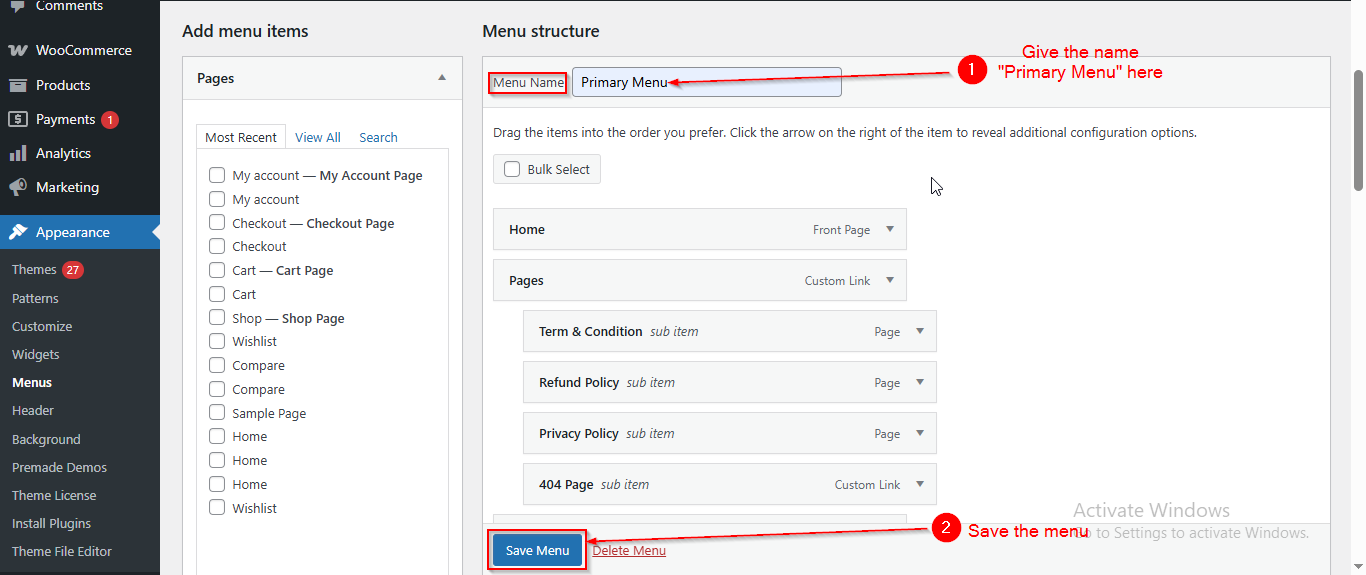
In this theme, the mobile menu will only appear if the Primary menu name is set exactly as “Primary Menu”.
If the menu has a different name, it may display in desktop view but will not appear in mobile view.
To fix this issue, follow the steps below:
Before proceeding, ensure you’re logged into your WordPress Dashboard.
- From the WordPress Dashboard, navigate to Appearance > Menus.
- Under the “Select a menu to edit” dropdown:
– If Primary Menu already exists, select it.
– If it does not exist, click Create a New Menu. - If creating a new menu, make sure to name it exactly Primary Menu and select Display Location as Primary Menu.
- After you just have to give the menu name as “Primary Menu”.
- Once that’s done , Save Menu.